
Simplifying 3D Vision: An Embedded Solution for Industrial Machine Vision - Hardware
In our previous post, we briefly described the hardware and software features of Robotic Ai Vision (RAiV). In this post we are going in details.
Hardware
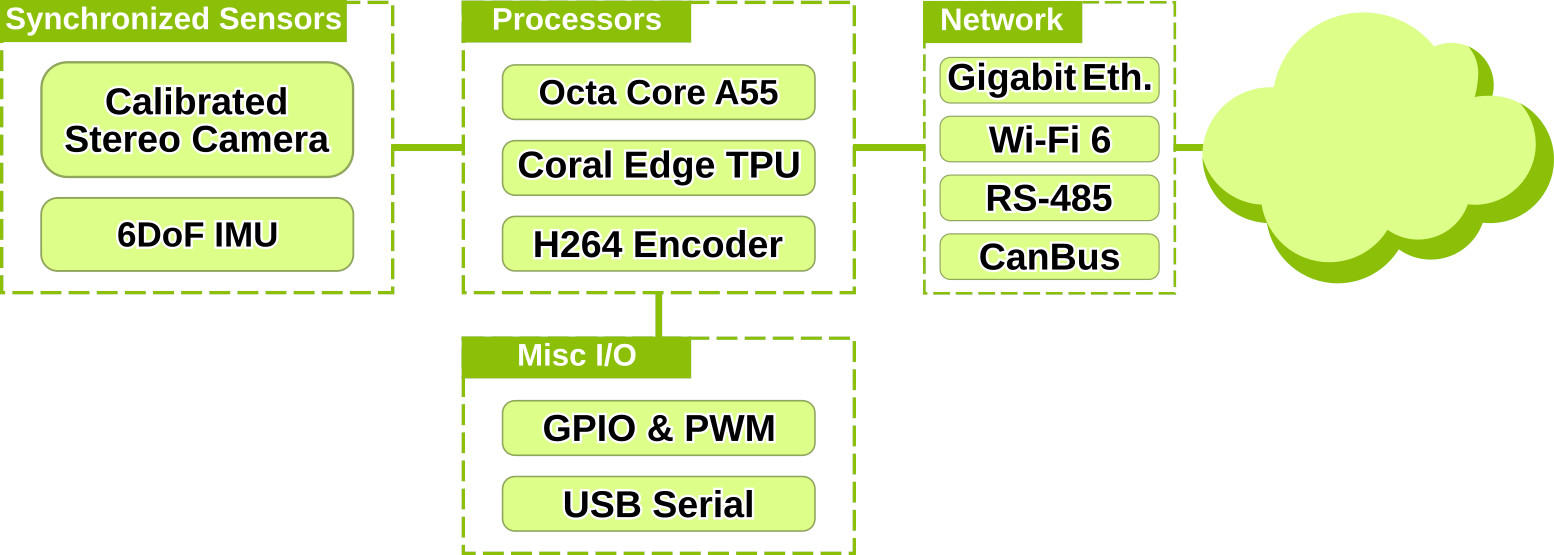
Synchronized Stereo Cameras and IMU
The imaging sensors that are used in RAiV have resolution 1600x1300 pixels. The stereo camera is by default running at 60FPS (frame per seconds). The output data format of sensors is Bayer pattern which is converted to RGB by software automatically. So, users can get RGB images by using our Python SDK without any effort. In addition to the imaging sensors, RAiV also has IMU (Inertial Measurement Unit). The IMU has 6 DoF (Degree of Freedom) with the utilization of 3 DoF Gyroscope and 3 DoF Accelerometer. Both gyroscope and accelerometer are running at 200Hz.
Having sensors is not enough for 3D vision. The core of 3D vision is synchronization and calibration. The imaging sensors are calibrated and all of the calibration parameters are accessible by user via our Python SDK. Moreover, in RAiV, we have synchronized imaging sensors and IMU with a hardware signal. Due to this, the captured stereo frames have time difference less than 50µs at 60FPS. And the IMU reports the time passed from the last synchronization signal at each sample.
With these features, users can implement 3D vision application in moving and rough environment.
Processors (CPU and NPU)
RAiV includes an octa-core Cortex-A55 for the CPU and a Google EdgeTPU for the NPU. Users can use both of the processors by uploading their python codes and Tensorflow Lite model.
For the utilization of CPU, RAiV has a sandboxed python environment. The python codes uploaded by user are first checked for semantic correctness and then for executability. If the uploaded codes pass the checks, RAiV runs the python codes.
The utilization of NPU is more straight forward. The only important point is the Tensorflow Lite model (.tflite) should be exported for "edgetpu" or compiled with "edgetpu_compiler". Otherwise, the Tensorflow Lite model is run completely on CPU.
Communication & Signaling Interfaces
RAiV was designed for flexible integration. To achieve this, RAiV has multiple communication and signaling interfaces. The user can utilize these interfaces by using our Python SDK.
All interfaces use industrial connectors with a push-pull locking system, except for the Ethernet connector and the Wi-Fi antenna connector, which are RJ-45 and SMA female, respectively.
H264 Encoder
For any vision system it is important to get live video feed from the camera. To achieve this RAiV has a hardware H.264 encoder and a dedicated WebSocket server. User can enable and disable the hardware H.264 encoder and its WebSocket server by using our Python SDK.
Software
Web based IDE
RAiV is designed for quick adaptation. To achieve this, RAiV is configured and programmed through its web interface. The configuration of RAiV can be made by logging into the "Administrator" account. And the programming of RAiV can be made by logging into the "User" account. More details on these interfaces can be found in RAiV Guide and our next blog post From Zero to Stereo
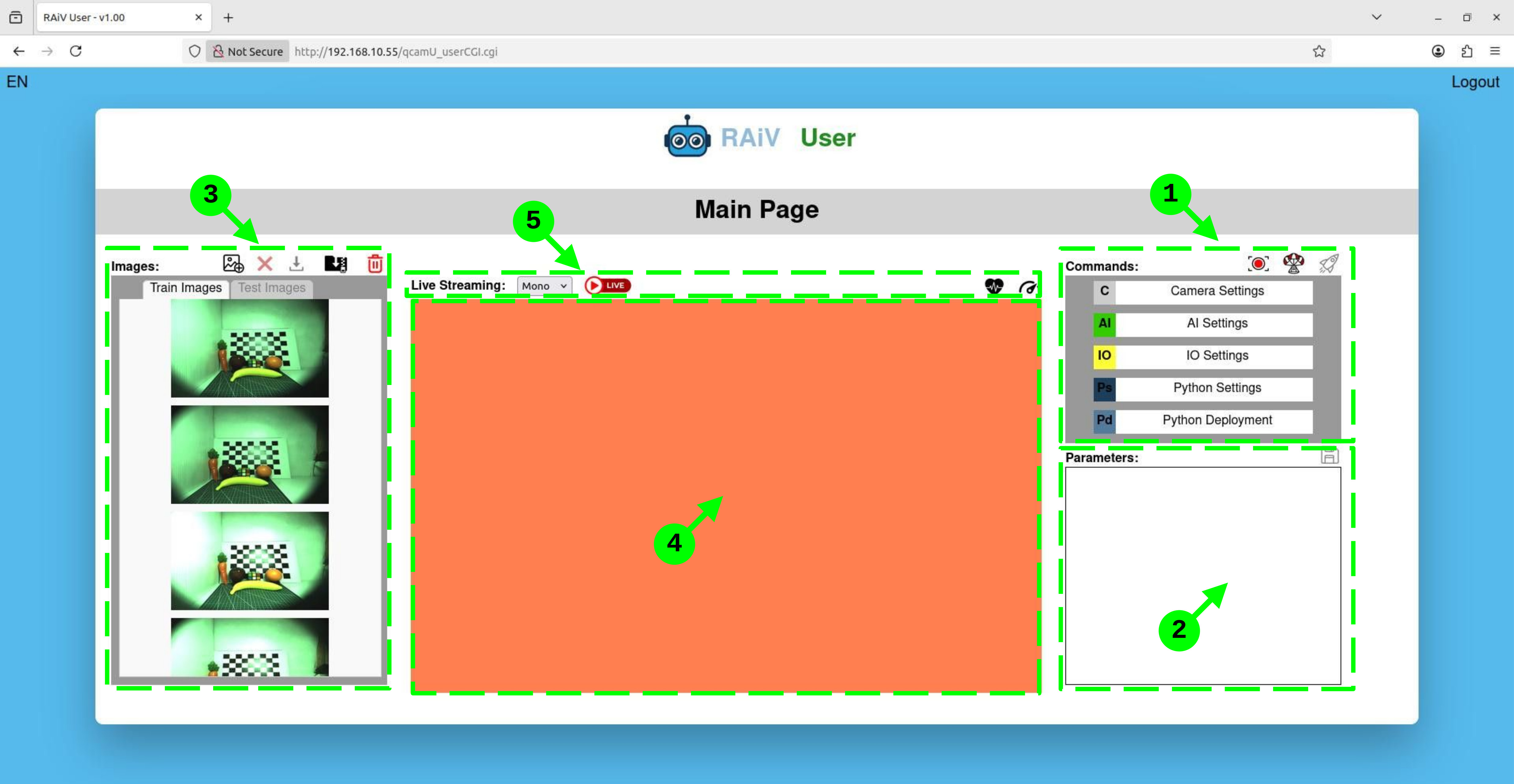
- Commands Panel
- Parameters Panel
- Image List Panel
- Screen Panel
- Streaming & Health Panel
Modular Architecture
RAiV’s python SDK allows its hardware features to be used on demand. Users can utilize all of the features or only the selected ones. For example, user can disable or enabled NPU, custom Python code execution and/or H264 Encoder. On the otherhand, currently, IMU is enabled by default and cannot be disabled.
Data Pipeline - Introduction
There are multiple data sources in RAiV. Depending on the source type, each of the generated data is routed to a single or multiple software parts. For example, the output of hardware H.264 encoder is routed only to WebSocket server. However, the output of IMU routed to image capture software and user software.
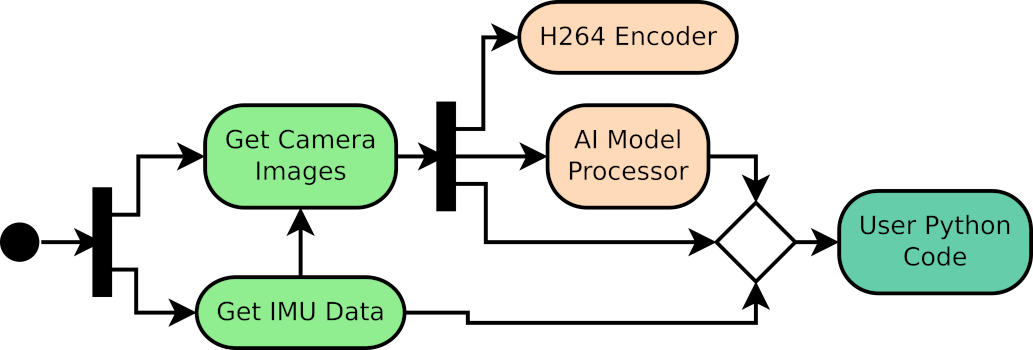
Your Python Code
To build custom applications and integrate to custom robotic and automation systems, RAiV allows users to upload and run their own python scripts and libraries. With our Python SDK and third party libraries (OpenCV4 and NumPy), users can implement their desired applications.
What is Next?
To get started:
From Zero to Stereo: Getting Started to Browser Based Development